Functionality
Note
Some functionality may be limited for non-locally deployed applications (e.g. demos), which by default uses AEROSPACE_CHATBOT_CONFIG=tester.
How the Frontend Works
The Streamlit app is initialized from app.py or via an access link to a pre-deployed container. The sidebar lists features which are used to manage databases, chat with PDF data, and visualize the PDF data. Each of the features, are described below. The available models and functionality is set by the AEROSPACE_CHATBOT_CONFIG environment variable.
Aerospace Chatbot
This is the main app which is used for querying and asking questions about the data uploaded from PDFs. Functionality here includes: memory of the previous prompt/queries, alternate questions based on the prompt and response, and source documents. These are available under the dropdown below the last response.
Before the first entry, you have the ability to upload files to the database.
To restart a conversation, click the “Restart session” button twice.
When a query is made, the responses are stored in a separate vector database. This database is used for visualization in the Visualize Data app, which can be used to explore.
PDF segments which are relevant are shown at the bottom and expandable.
Database Processing
Note
This app is restricted use with AEROSPACE_CHATBOT_CONFIG=admin. See Configs for details.
This app is used to manage databases. You can add, delete, and update databases. There are options available to export intermediate files for debugging or further processing.
Deleting existing databases is available via the connection status dropdown.
Visualize Data
Note
This app is restricted use with AEROSPACE_CHATBOT_CONFIG=admin. See Configs for details.
This app allows visualization using Spotlight from Renumics. A new browser will open with the visualization. The data is loaded from the database and the settings are applied from the sidebar.
Under construction
How the Backend Works
The backend refers to the modules which are used to process and return data. They generally are not user facing.
A visual overview of how this code works is below. The parts of this which are utilized in this code are highlighted.
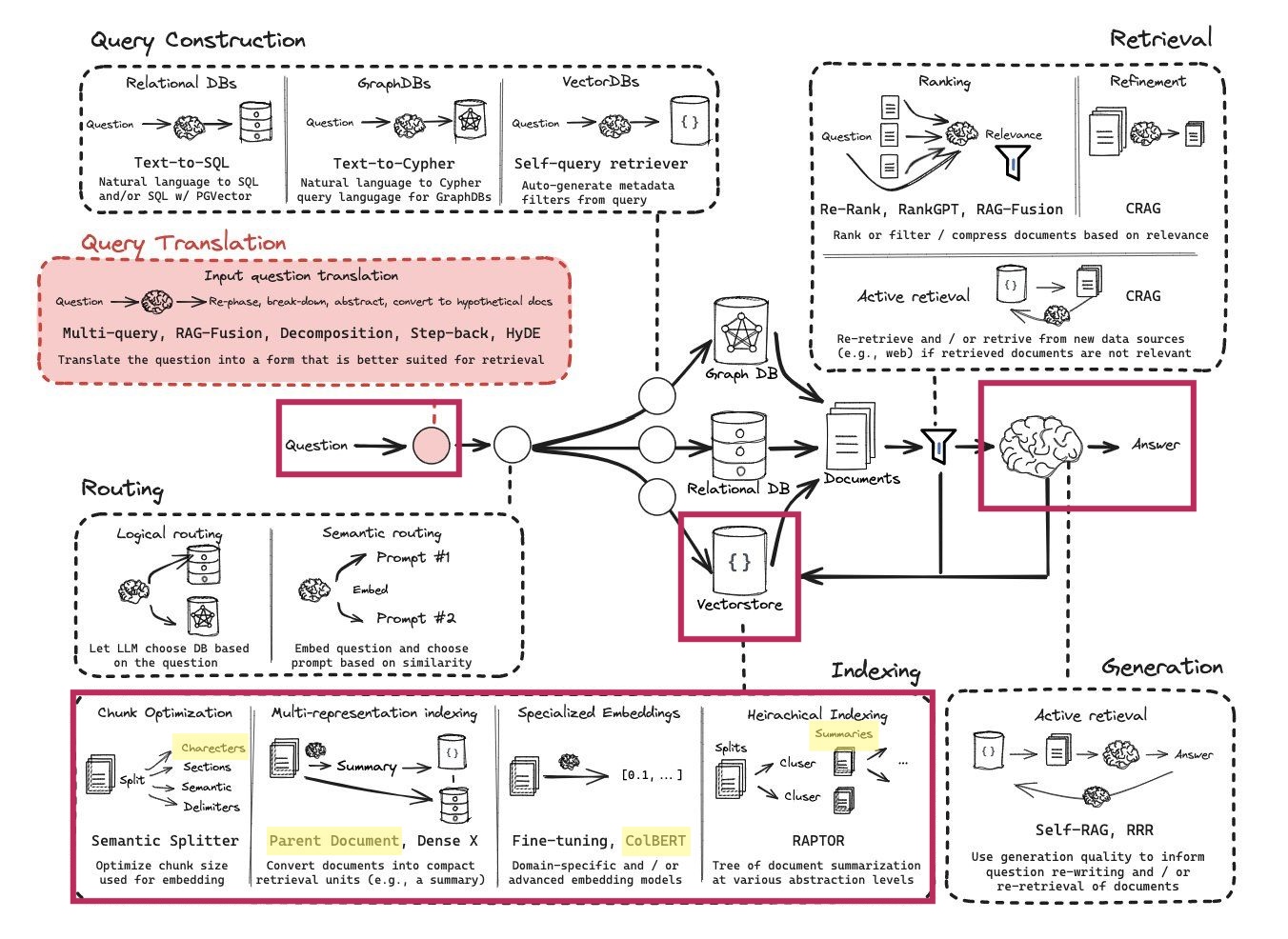
Of note, there are many areas of this workflow which have not been explored practically but have a lot of potential. The areas which are implemented, which are of interest and highlighted are:
Chunk optimization: currently this is in the form of a fixed number of words per chunk.
Multi-representation indexing: it is possible to index with the document chunks and generate summaries for each chunk which are used when providing answers.
Specialized embeddings: Instead of using a vector database, it is possible to create a context optimized retrieval model with ColBERT. This is performed using RAGatouille.
Heirarchical indexing: It is possible to upload small document chunks, which are compared to user queries, then return the parent document chunk when providing the response to the use.
A very practical overview of how this works is also here.
Sequence of operations
1. PDF files are converted to text and “chunked”
PDf files are read page-by-page and the text is extracted. Currently, no table or images are pulled, but this could be done in the future.
2. Chunks are converted to embeddings
Embeddings are multi-dimensional vectors which capture the meaning of the text. These are generated using a pre-trained model. Models which are used are captured in the config file. Refer to Configs for more information.
3. Chunks are uploaded to a database
Document chunks are uploaded to a database as embeddings.
The primary two methods for storing embeddings: - ChromaDB: this is a locally defined database. It is free but not web-based. - Pinecone: this is a web-based database. It is not free but web based.
Advanced functionality
Parent-child: a local database is created which matches “Parent” chunks to “Child” chunks. The “Child” chunks are references when the user query is made, but the “Parent” chunk is returned to the LLM when formulating a response.
Summaries: similar to Parent-Child, except a summary of the chunk is created using an LLM and stored on a local database.
RAGatouille: refer to RAGatouille for more information. This is a specialized retrieval model which is optimized for the information you are trying to retrieve.
4. User query is converted to an embedding
Identical to step 3, except for the user input.
5. User query is compared to database
The user query is compared to the database of embeddings and a relevancy search is performed to return the most relevant information.
When this information is returned, the source information from the PDF is also returned so the user can access the original document.
Advanced functionality
If Parent-Child or Summary RAG types are used, the Parent Chunk, or Summary of the most relevant chunk found in the database.
6. Response is generated using an LLM
The response is generated using an LLM. The response is generated using the context retrieved and the LLM you specify. The choice of prompt is important because it will minimize hallucination of the LLM and also only return the most relevant information.
The prompt which is used to return the response at the end of this process is located here in LangSmith dmueller/ams-chatbot-qa-retrieval.
The response is then returned to the user.
7. Visualization
For locally deployed applications, Renumics Spotlight is used to visualize the embeddings and related data. This is particularly valuable to see related data to queries made and clustering.
Secret Keys
Secret keys are set when the streamlit app loads.
The exception is for LOCAL_DB_PATH, which is set only as an environment variable. This is for portability reasons to Docker and other deployments.
See Configs for more information.
Advanced functionality
RAGatouille
RAGatouille docs are located here: - Github Repository - API docs
This functionality will create an indexed database using ColBERT late-interaction retrieval. For each document chunk which is uploaded it will take approximately 1-2 seconds. To not exceed context limitations of ColBERT, each document provided will be split into 256 token chunks.
Parent-Child RAG
Under construction
Summary RAG
Under construction